Less Is More: Why Audio on SoundCloud Looks Different
Last year, SoundCloud upgraded its AAC encoder for the first time in over a decade. The new one (Fraunhofer’s libfdk_aac) delivers higher perceptual audio quality across every metric we track.
But if you look at a spectrogram, you may notice something unexpected.
Here’s the scenario: you upload a lossless master. You download your track from SoundCloud and open it in a spectrum analyser. There’s a hard shelf at 17 kHz where there used to be energy all the way to 20 kHz. The old encoder kept those frequencies. The new one removes them.
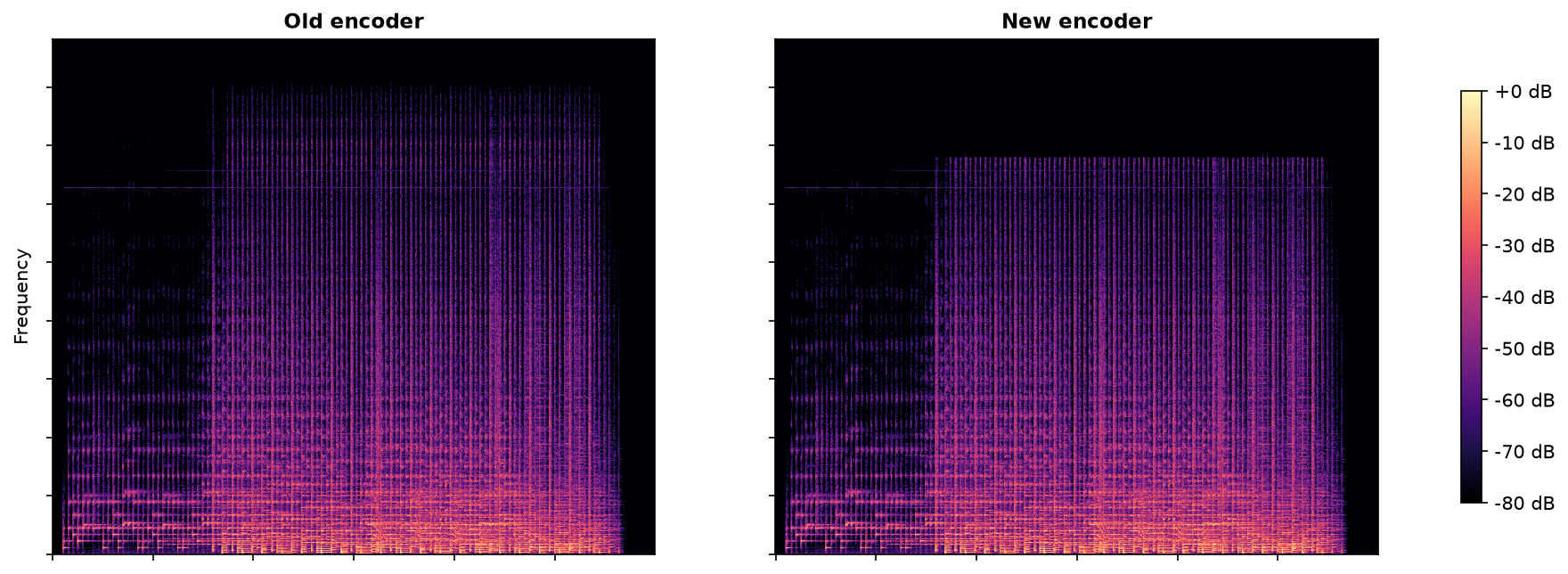
It looks like a downgrade. It’s actually the opposite. Here’s why.
Lossless vs lossy
A lossless file (WAV, FLAC) keeps every sample intact. What goes in comes out, bit for bit. No decisions, no compromises.
Lossy compression (AAC, MP3, Ogg) is a different game. The encoder has to throw something away to hit a target file size. The question isn’t whether it loses information. It will. The question is what it chooses to lose.
Make Every Bit Count
When SoundCloud compresses your upload to AAC, the encoder gets a fixed number of bits per chunk of audio. It splits those across frequency bands. More bits per band means a more faithful reproduction. Fewer means more distortion.
There are never enough bits for everything. The encoder has to pick where to spend them.
Play with the sliders. As the bitrate drops, the quantized signal drifts further from the original frequency distribution. But pull the low-pass filter left and something interesting happens: the encoder gives up the top frequencies and everything else gets sharper.
That’s the tradeoff: drop what you can barely hear, get a cleaner signal where you can.
Why the Upper Frequencies?
Human hearing isn’t flat. We’re most sensitive between 2 and 5 kHz. Sensitivity decreases significantly at higher frequencies, and most adults cannot reliably perceive tones above 17 kHz, even under ideal listening conditions.
Because of this, the highest frequencies offer one of the most efficient opportunities for bitrate optimization. A small reduction at the very top of the spectrum allows the encoder to improve accuracy across a much broader range of audible content.
While a spectrogram treats every frequency equally, our ears do not. The encoder is designed around how people hear, not how graphs look.
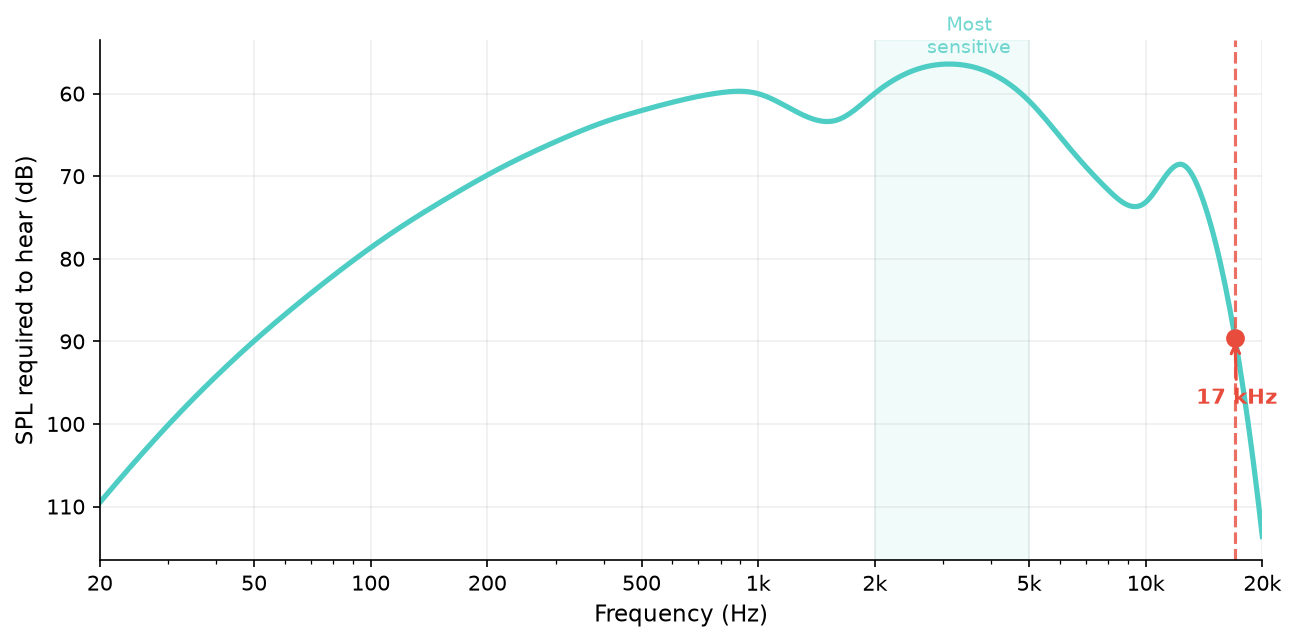
The encoder cuts where it costs the least.
You could ask why it doesn’t cut bass instead. Low frequencies take very few bits to encode, and you feel them as much as hear them. The top of the spectrum is the cheapest sacrifice by far.
What this looks like on real audio
Here’s a pop mix run through the old and new encoders. This plot shows the difference between the encoded audio and the original. Red means energy was removed, blue means the encoder added something that wasn’t there (artifacts).
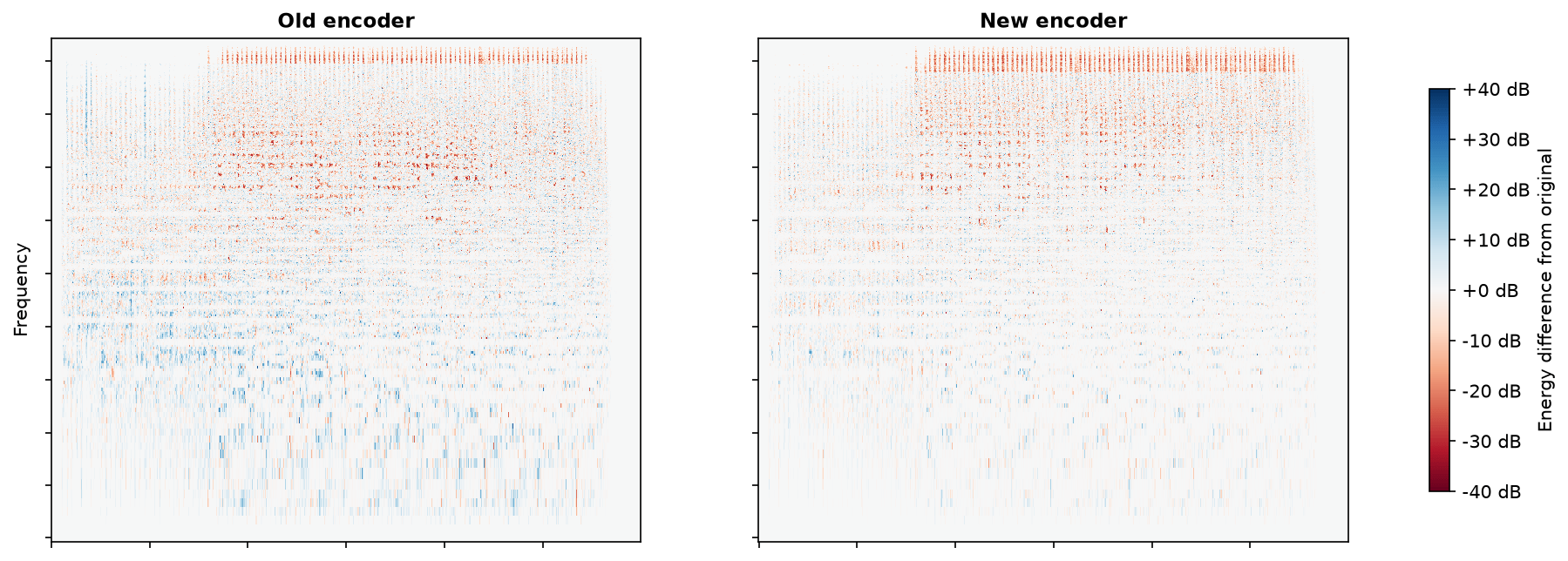
The new encoder (right) makes one clear sacrifice: a red band at the top where it deliberately cut. Below that, almost nothing. The old encoder (left) is a different story: speckled red through the upper mids (signal lost in the range you hear best) and blue patches in the low end (artifacts the encoder invented). It’s fighting everywhere at once.
Here’s the same story as a bar chart, comparing the same encoder with and without its low-pass filter:
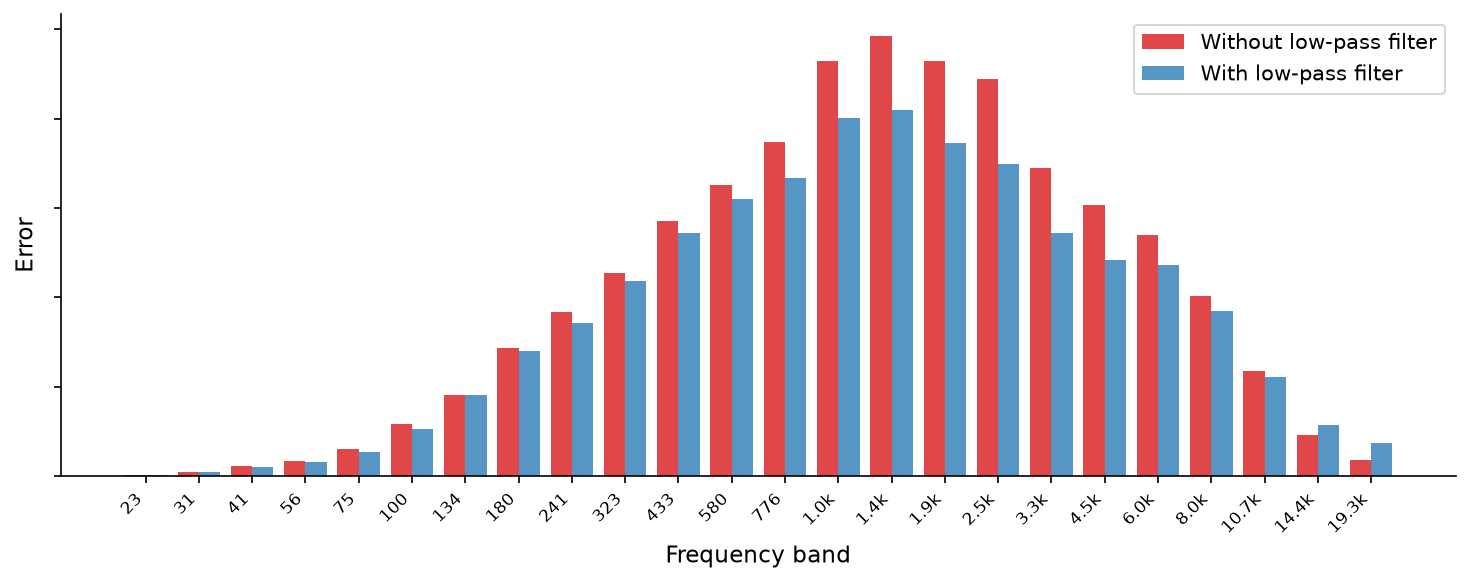
With the filter off (red), error rate is higher across the mid-range, right where your ears are sharpest. With the filter on (blue), those bands get more bits and the error drops. The filter is doing exactly what it should: trading the indiscernible top for a cleaner middle.
But what about 256 kbps?
This is a fair question. At 256 kbps there are nearly enough bits for everything. You’d expect full bandwidth to work fine. And it almost does.
But “almost” still leaves the encoder making hard choices in the mid-range on complex passages. The encoder we use (libfdk_aac, Fraunhofer’s implementation) is conservative: even at 256 kbps it applies a gentle rolloff around 17 kHz. The improvement is smaller than at lower bitrates, but it’s still measurable.
Is this the right call at 256 kbps? Genuinely debatable. But it’s not arbitrary. Fraunhofer validated these cutoff points with extensive listening tests over decades. The threshold exists because trained listeners couldn’t reliably tell the difference, and the freed bits made the rest of the signal measurably better.
Listen and Decide
We can show you graphs all day. Here’s a blind test instead. Three clips of the same audio. The original and two encoded at 256 kbps: one with the low-pass filter, one without. Can you tell which is which? Which has the low-pass filter applied?
The bottom line
Your track isn’t broken. It just sounds better than it looks.